Arizona-Sonora
Desert Museum.
A four-person team, a four-month UX research process, and a redesign that turns a content-rich site into an actionable visit-planning tool.
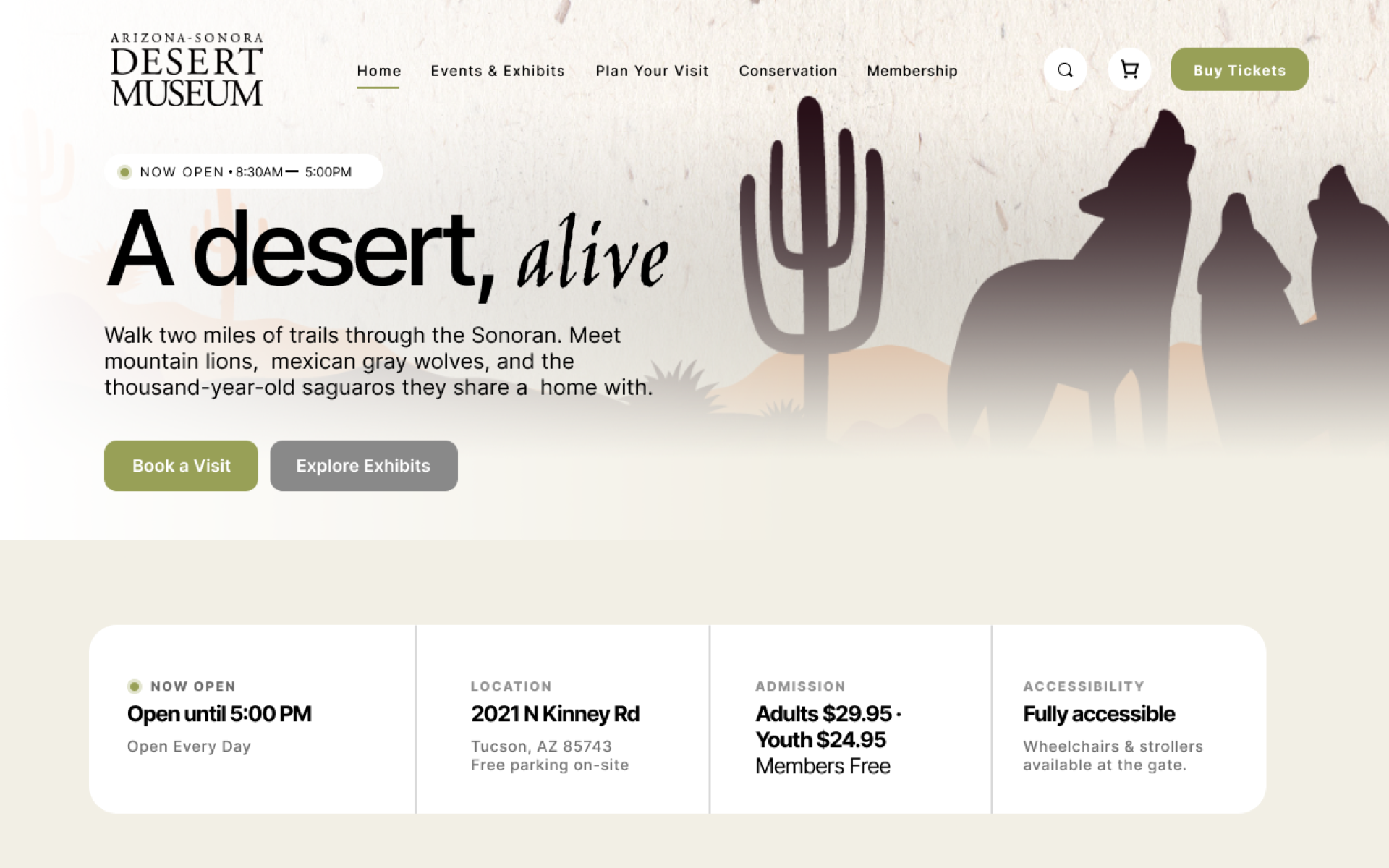
The website
is the visit, before the visit.
The Arizona-Sonora Desert Museum has 98 acres of trails, 230 animal species, and a century of conservation work to show. None of that matters if a first-time visitor can't figure out the hours, find the touch-animal events, or buy two adult and one child ticket without restarting the flow three times. The website is the gate. Most of our research showed that gate is sticking.
A real museum. A real audience. A real research budget of zero.
Our team was assigned the Arizona-Sonora Desert Museum for a semester-long UX research project. The brief: identify what was working, what wasn't, and propose a redesign grounded in evidence.
The constraint that shaped the project: this wasn't a rebrand. ASDM has a strong identity, a beloved physical experience, and decades of trust. Anything we proposed had to make the existing content easier to act on - not start from a blank canvas.
That constraint matters. It's the difference between “design a museum website” (an undergraduate exercise) and “diagnose what's broken on a real site, with real users, and propose surgical fixes” (the actual work product designers ship).
Why this museum. ASDM's site is genuinely content-rich - long pages, deep menus, lots of programs. That density is exactly what makes usability problems both real and instructive. A thinner site would have nothing to fix.
Each stage shaped the next.
We didn't guess what was wrong. We funneled five research methods so each one's output became the next one's input.
Heuristic evaluation
Four independent passes against Nielsen's 10 heuristics, scored 0–4 for severity. Flagged the high-friction zones before we asked any users.
User research survey
25 respondents from the target audience - three sections: general behavior on museum sites, specific usability issues, demographics.
Persona creation
Three personas synthesized from survey patterns: The Planner, The Visual Explorer, The Self-Guided Visitor.
Usability testing
9 participants, remote via Zoom screen-share, moderated. 6 tasks across the three friction zones. Each researcher facilitated 3 sessions, one for each persona. Think-aloud, pre/post questionnaires, audio recorded.
Prototyping
Lo-fi wireframes for the homepage, events page, and ticketing flow → hi-fi prototypes in Figma → final recommendations doc.
The ordering is not decorative. It's how you avoid the most common UX mistake: testing the wrong thing. By the time we ran usability sessions, we already knew where to look - the heuristic eval and survey had told us the homepage, events page, and ticketing flow were the three areas worth measuring.
17 issues. 9 participants. One pattern.
Friction concentrates at visit planning and information findability - not at checkout. Once users could find what they wanted, they completed every purchase task at 100%. The problem was getting there.
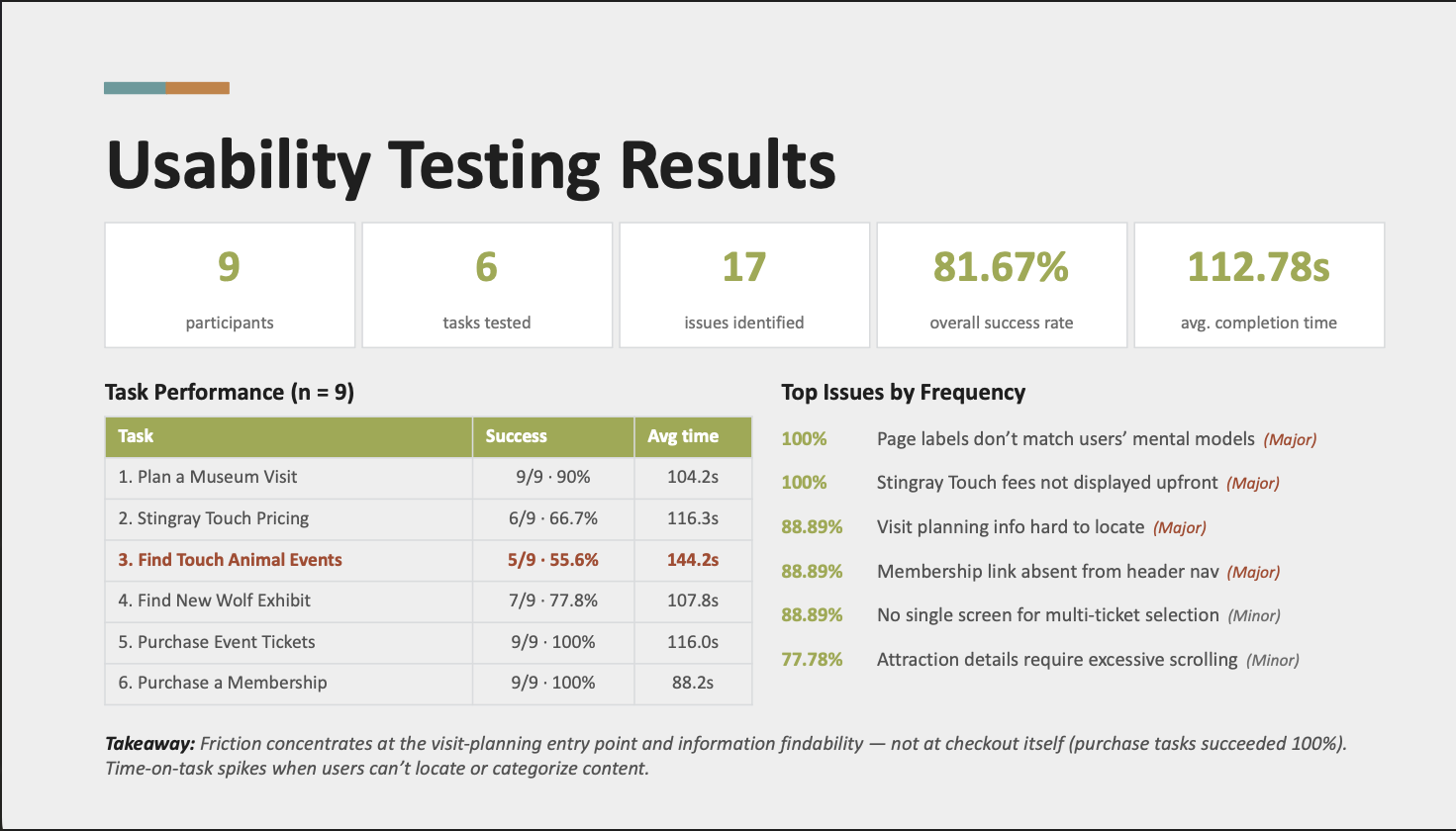
·Top issues by frequency
The lowest-success task in the entire study was “Find Touch Animal Events”- only 5 of 9 participants succeeded (55.6%), with an average completion time of 144.2 seconds. The site has the events. Users couldn't find them.
·What participants actually said
“I see the animals section but I don't know where exhibits are listed separately. It all blends together.”- Participant JS-1, on Task 1 (Plan a Museum Visit)
“I don't see a calendar or events link anywhere in the main menu. I had to scroll all the way down to find some…”- Participant JS-3, on Task 3 (Find Touch Animal Events)
“Wait, quantity. How come it's not two? How can I edit it? Okay, I need to go back. Buy tickets.”- Participant FA-1, on Task 5 (Purchase Event Tickets)
·The headline number
Aggregated across the 9 sessions, the post-test SUS-style rating averaged ~62/100- Nielsen's “marginally usable” band. Participants rated the overall experience 3.2/5; 4 of 9 said the website made planning a visit difficult; 5 of 9 wanted Events or Calendar promoted to a top-level nav item. Across the 9 participants, we logged 86 individual issue observations, which consolidated into 17 unique issues: 37 Major instances, 36 Minor, 10 Strong Suggestions, 3 Suggestions, 0 Blockers.
Takeaway. Time-on-task spikes when users can't locate or categorize content. That isn't a checkout problem - it's an information architecture problem at the entry point. All three of our redesign recommendations target that entry point.
Each one earns its priority by hitting an issue with ≥88.89% frequency or <60% task success.
We grounded each recommendation in established UX principles from the Laws of UX- Fitts's, Hick's, Jakob's - so the rationale would survive a stakeholder challenge that started with “but I think…”
Streamlined Homepage
Fitts's Law · Hick's Law
Tagline hero with two clear CTAs (“Book a Visit” / “Explore Exhibits”) plus an at-a-glance info row (Hours, Location, Admission, Accessibility).
Compiled Events Page
Hick's Law · Jakob's Law
Dedicated “Things to See & Do” landing with prominent CTAs, leading to event-detail pages with scannable card grids.
Streamlined Ticketing Flow
Fitts's Law · Jakob's Law
Single bookings cart with quantity steppers for every ticket type - no more restarting the flow per type.
Three problems on one page.
The current ASDM homepage fails at the most common task users come to do.88.89% of usability test participants couldn't locate visit-planning information.60% of survey respondents said they want a minimal, informative homepage. The hero rotates exhibit promotions while the actual job - “help me plan my visit” - happens in a buried submenu.
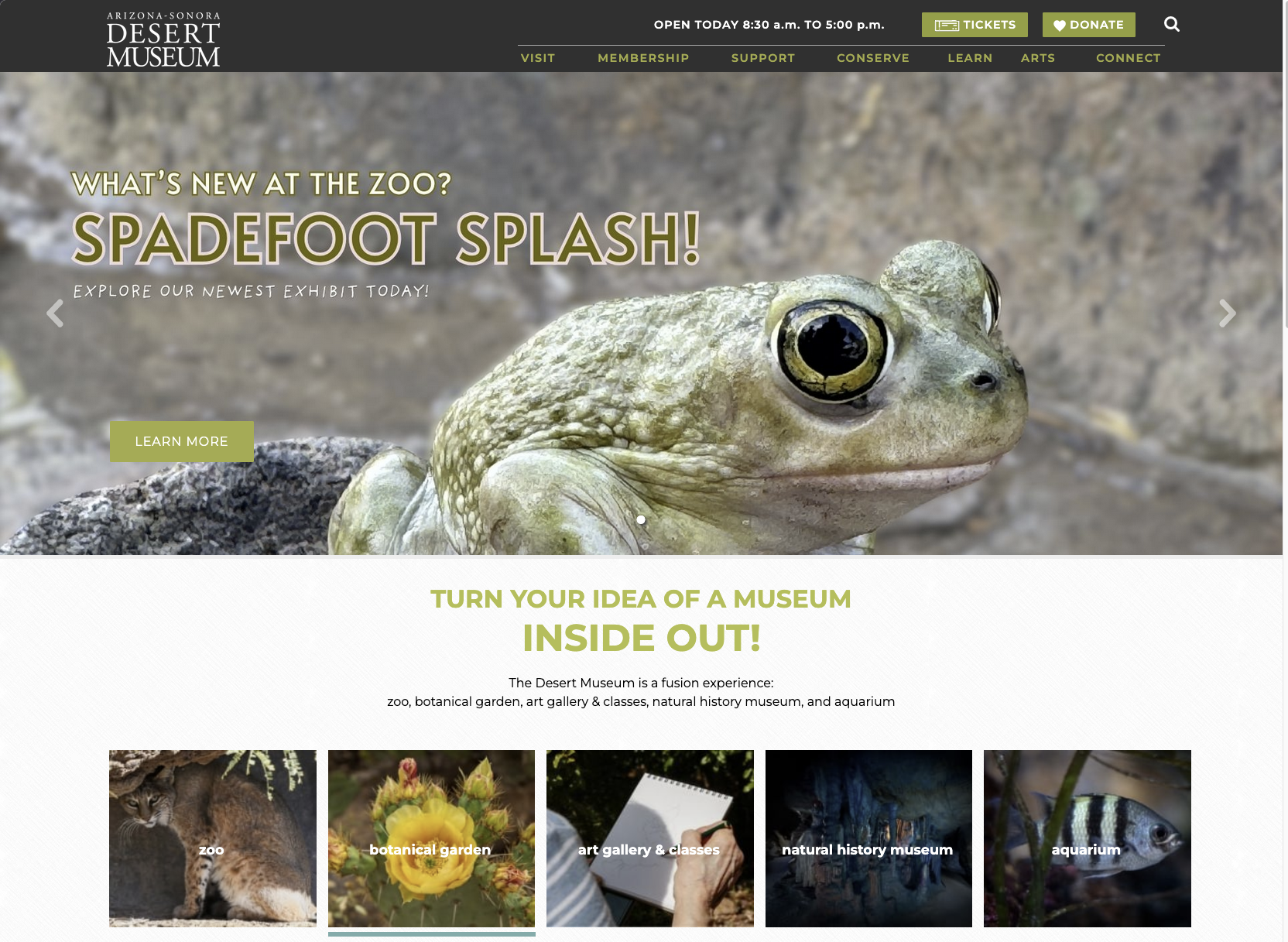
·Three decisions, made in order
Replace the rotating exhibit hero with a tagline + two CTAs
Why: Fitts's Law - primary CTAs should be large, central, fast to acquire. The rotating hero forces users to wait through promotional content before they can act on the task they actually came to do.
Result: “A desert, alive.” tagline + Book a Visit / Explore Exhibits CTAs. Single decision, two paths, both above the fold.
Add an at-a-glance info row below the hero
Why: Hick's Law - every user who lands here has the same four questions: are you open, where are you, how much, can I bring my grandfather's wheelchair. Make those answers pre-decided, not searchable.
Result: Hours · Location · Admission · Accessibility row. Four cells, four answers, zero clicks.
Collapse the mega-menu to five top-level links
Why: The current navigation has 40+ items across 7 categories. Hick's Law again - the time to choose increases with the number of options. The 100% “page labels don't match mental models” finding meant simplifying labels mattered as much as reducing count.
Result: Home · Events & Exhibits · Plan Your Visit · Conservation · Membership - five primary links. Plus search, cart, and a Buy Tickets CTA on the right.
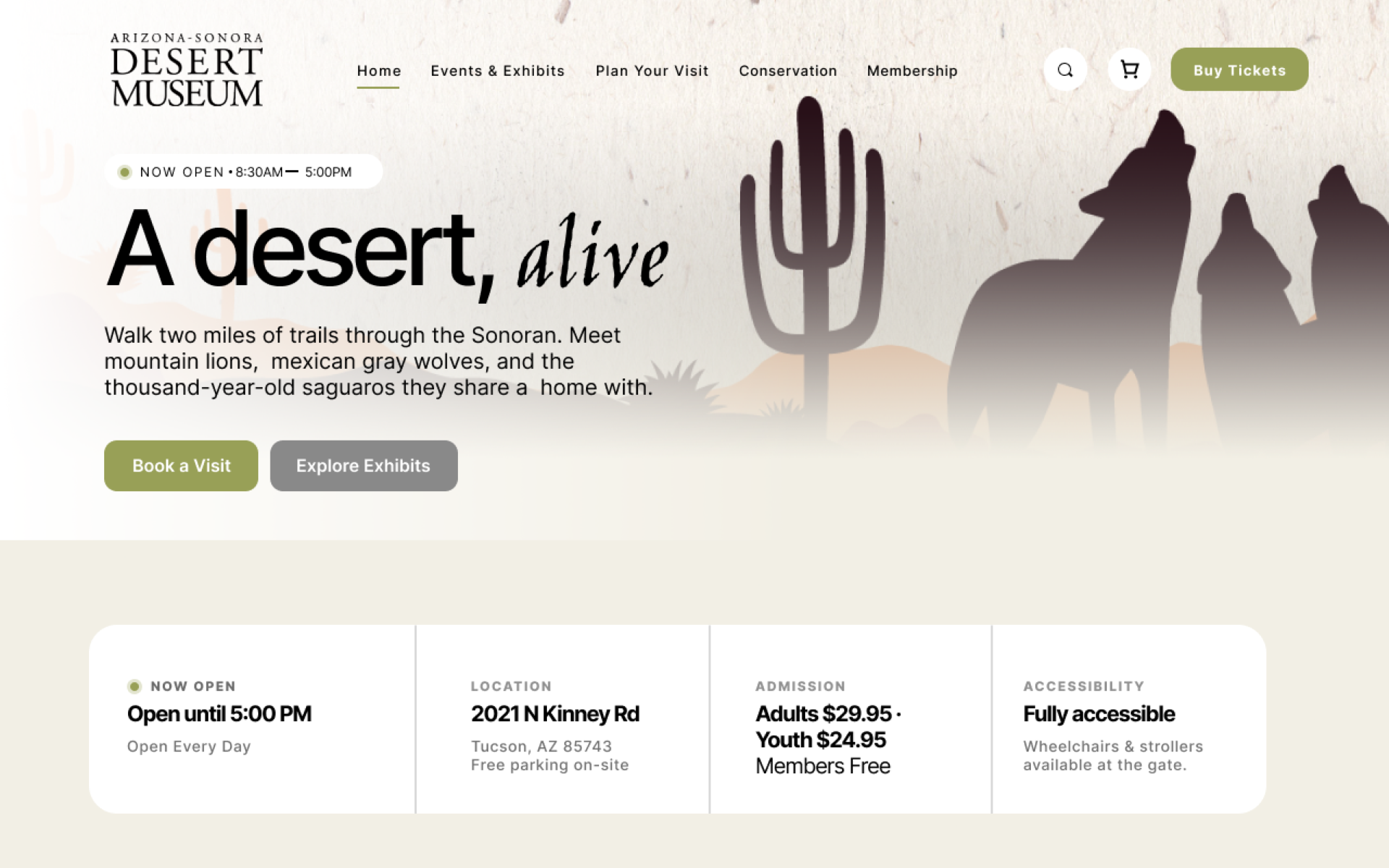
·Below the fold: from carousel chaos to scannable content
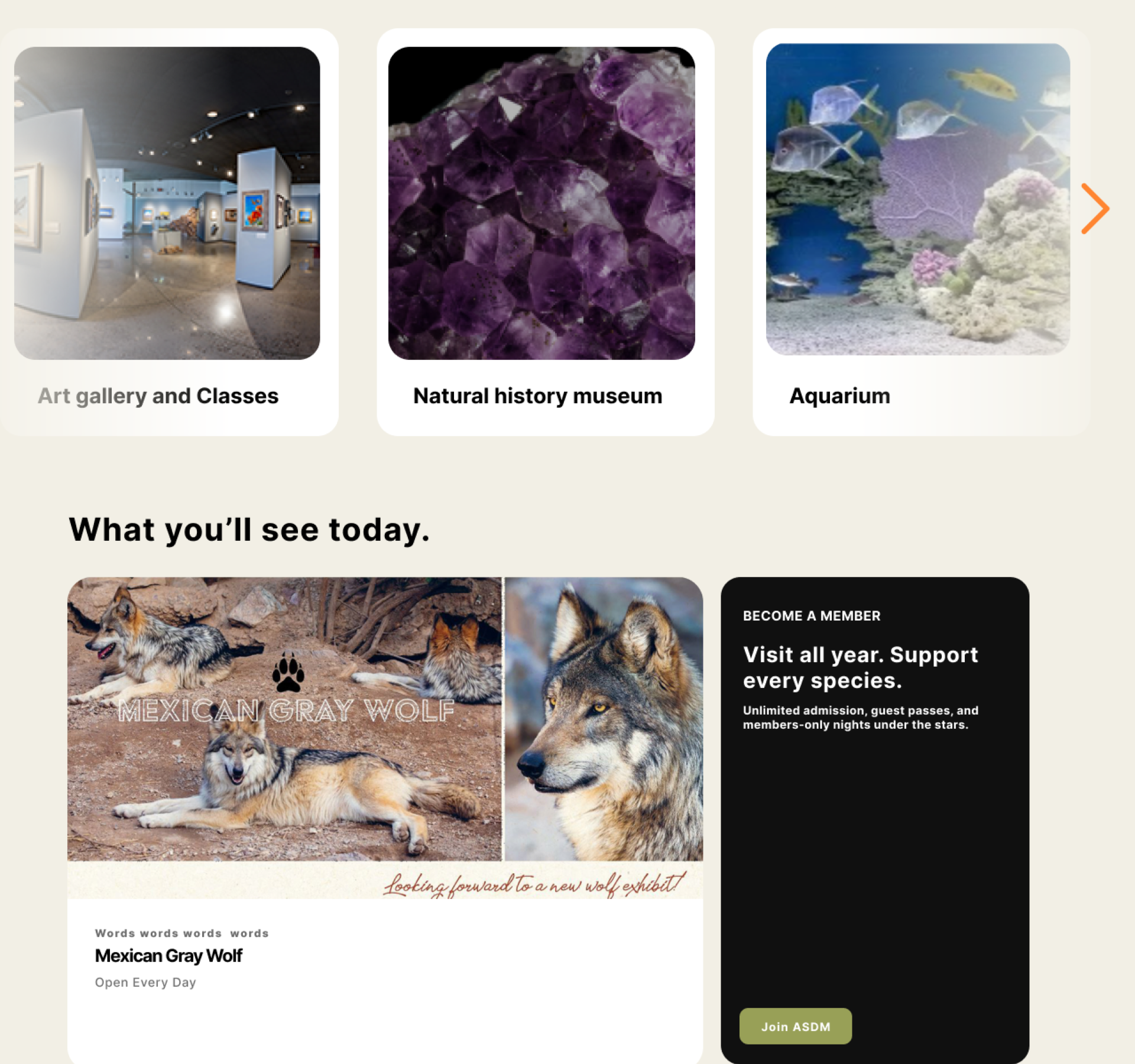
The original homepage's “Happening Now” section is a five-card carousel of dense flyers - most users scroll past it without engaging. Survey data showed 60% of respondents wanted a balanced mix of visuals and concise text, not information-dense walls of text.
Saguaro Strategies. Four members. Honest scope.
This was a four-person team for four months. It was not a solo project, and the scope should be represented honestly. Here's who did what.
Co-developed the survey instrument, co-created the three personas, facilitated 3 of 9 usability test sessions (DW-1, DW-2, DW-3 - one for each persona), contributed to results coding, designed the homepage redesign (lo-fi → hi-fi), co-authored the final recommendations deck.
Led the events page redesign - “Things to See & Do” landing, event-detail pages, filter and sort controls.
Led the ticketing flow redesign - single bookings cart, quantity steppers, integrated date-picker booking modal.
Led usability test analysis, results coding, severity rating, and synthesis into the final recommendations document.
The research methods - heuristic evaluation, survey design, persona creation, test plan, recordings - were collectively owned. The redesign work was divided so each team member led one of the three priority pages.
Why this matters in a portfolio. Two of my other case studies are solo work. This one is the evidence that I work on teams, divide scope cleanly, and don't overclaim credit for what teammates owned. That's the question hiring managers actually need answered.
The research we couldn't fit in a semester.
A four-month UX research project ships the version of the work that fits in four months. Here's what we'd add if this were a real engagement, not a class:
- Eye-tracking on the redesigned homepage. Validate the hero-CTA hypothesis - do users actually look where we expect them to look?
- A/B test single-screen ticketing vs the current flow. Our usability test surfaced the friction; an A/B test would quantify the conversion lift.
- Mobile-first usability testing. Our sample skewed desktop. Most museum-trip planning happens on phones.
- WCAG 2.1 AA accessibility audit. Color contrast, alt text, keyboard navigation. Especially important for a museum that markets accessibility as a feature.
- Recruit Spanish-speaking and first-time-visitor participants. ASDM is in the Sonoran borderlands. The current research sample didn't reflect that.
The pattern in this list isn't “more is better.” It's “here's what we'd need to be confident, in production, with real stakes.” That distinction is what separates a portfolio piece from a published recommendation.