Find Your Fix.
A 40,000-member 3D-printing community had a great help wiki that almost nobody read. The fix was never more content. It was delivering the right answer the moment someone asks.
Evidence. A Nielsen heuristic audit flagged two catastrophes. A content analysis of 104 posts found about half were self-serve-solvable, and ~15% were hardware defects mis-routed as user error.
Role. Self-initiated, end to end: I did the research, the information architecture, and the design, then built and deployed the bot and dashboard. I help moderate the community.
Outcome. “Find Your Fix,” a guided flow that finds the fix before a post is made, and protects the people who answer. Greenlit by the lead moderator for a live trial.
The help already existed. It just never reached people when they needed it. And answering the same question every day was wearing out the volunteers. Find Your Fix closes both gaps at once.
The same questions, over and over.
The community is one of the largest for a consumer 3D-printer brand. Most members are first-time owners, and they land in the #help forum stuck on the same handful of problems.
A content analysis of 104 posts made the pattern clear. About half had a known fix, and the same issues kept coming back: software and slicing, filament that will not feed, prints that will not stick.
The answers already exist. The manufacturer publishes a good wiki, and a bot auto-links it on every post. But the wiki lives off Discord. There is no quick, standard way to step through it and find what is actually wrong. So people skip it, post “help!”, and wait.
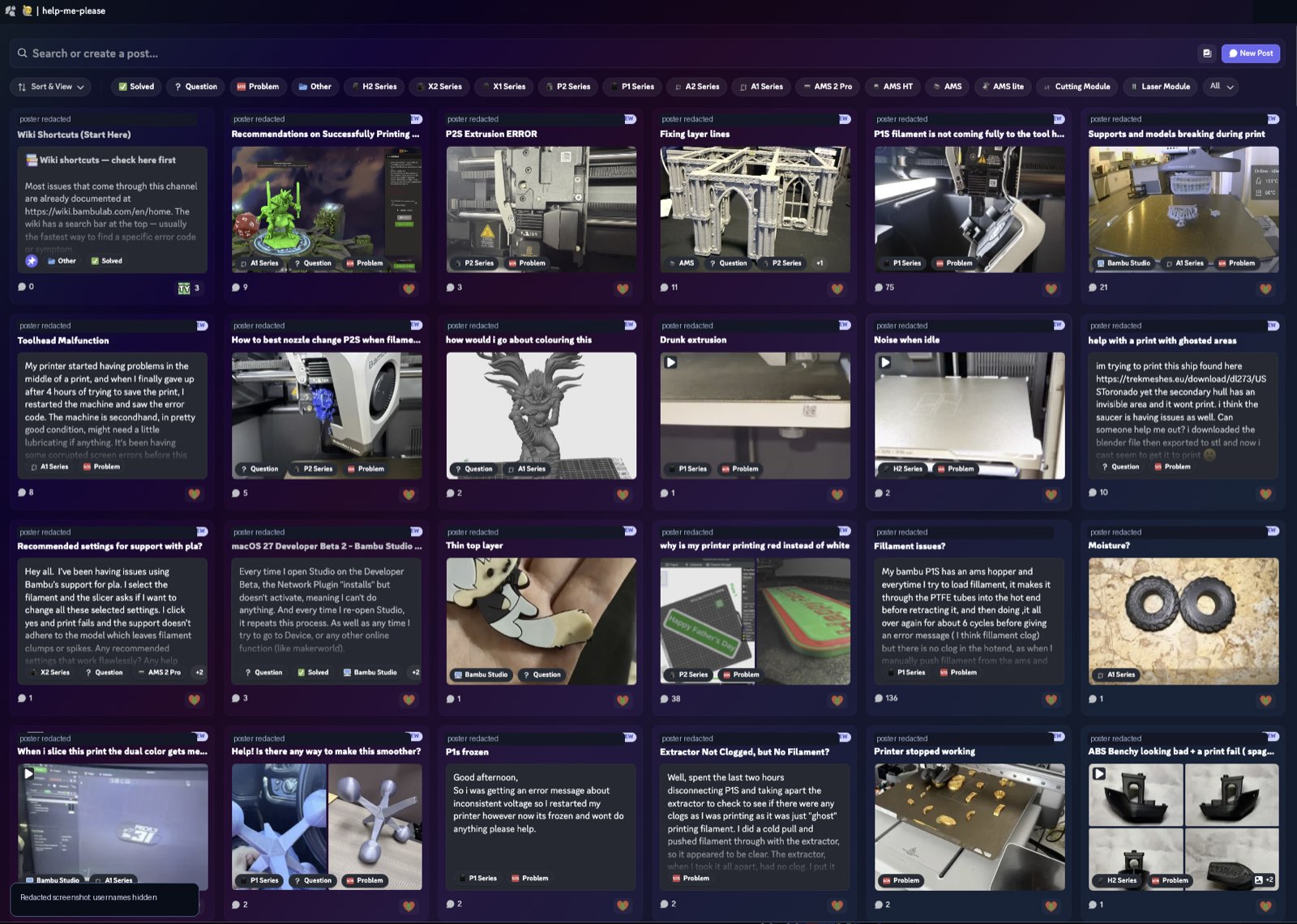
 The community: a 40,000-member 3D-printing forum, mostly beginners.
There is a second problem, and I see it from the inside. I help moderate the community and answer the forum, so I watch the volunteers burning out. The advice gets ignored (the classic “wash your plate”). The same questions come back the next day. Some people treat free help like paid support. Good helpers go quiet, and they are the only safety net there is.
More content was never the answer. The mod team had even built a supplementary site on top of the wiki, and the repeats did not stop. The lever is not publishing more. It is getting people to the answer that already exists, the moment they are about to post.
Two catastrophes, and everything downstream.
I ran a Nielsen heuristic audit of the whole help experience and scored each heuristic for severity. Two scored as catastrophes.
Fig. 2. The full Nielsen pass. The two catastrophes, H4 (no standard for asking) and H5 (nothing preventive), drive almost every other failure. Fix those two and most of the rest go with them.
The core insight. The bot only ever reacted after a post, with a generic link. Nothing happened before, when a duplicate or a low-context “help!” could still be prevented. The lever is structured intake, not more content.
Half the questions were already solvable.
To design the fix, I needed to know what people actually ask. So I coded 104 help posts by what the system should do with each one.
Two of those numbers are the cost, in plain sight. Four in ten askers never get a working answer at all, which is what quitting quietly looks like. And roughly one in five posts arrives without even a printer model, so the first reply is a helper asking for basics instead of helping.
The topic was not the useful cut. What mattered was a different question: what should the system actually do with each post? Coded that way, the 104 posts fell into three buckets.
Guide to the known fix
Clogs, bed adhesion, AMS loading, nozzle cleaning, slicing settings, error-code lookups. A known answer already exists.
Structure it, then hand off
“Does anyone recognize this?” cases that genuinely need a photo and a person, but should arrive with the context already gathered.
Stop, and route to support
A dead heating module, force-sensor errors, screen corruption. Troubleshooting a defective unit just wastes a frustrated person's time.
That third bucket is the important one. Knowing when the system should stop helping and escalate is the real judgment call. An assistant that tries to troubleshoot a defect is worse than no assistant at all.
“About to give up… I just don't understand what I'm doing wrong.”A beginner in the help forum (45 replies)
That is who the flow is for: the three-weeks-in beginner who cannot tell a setting from a clog from a defect, and is one bad night from quitting.
Find Your Fix, in three parts.
Find Your Fix has three parts. A flow people click through before they post. A tool that lets moderators keep that flow current. And a standard for how to ask when a post is still needed.
A click-through flow, inside Discord
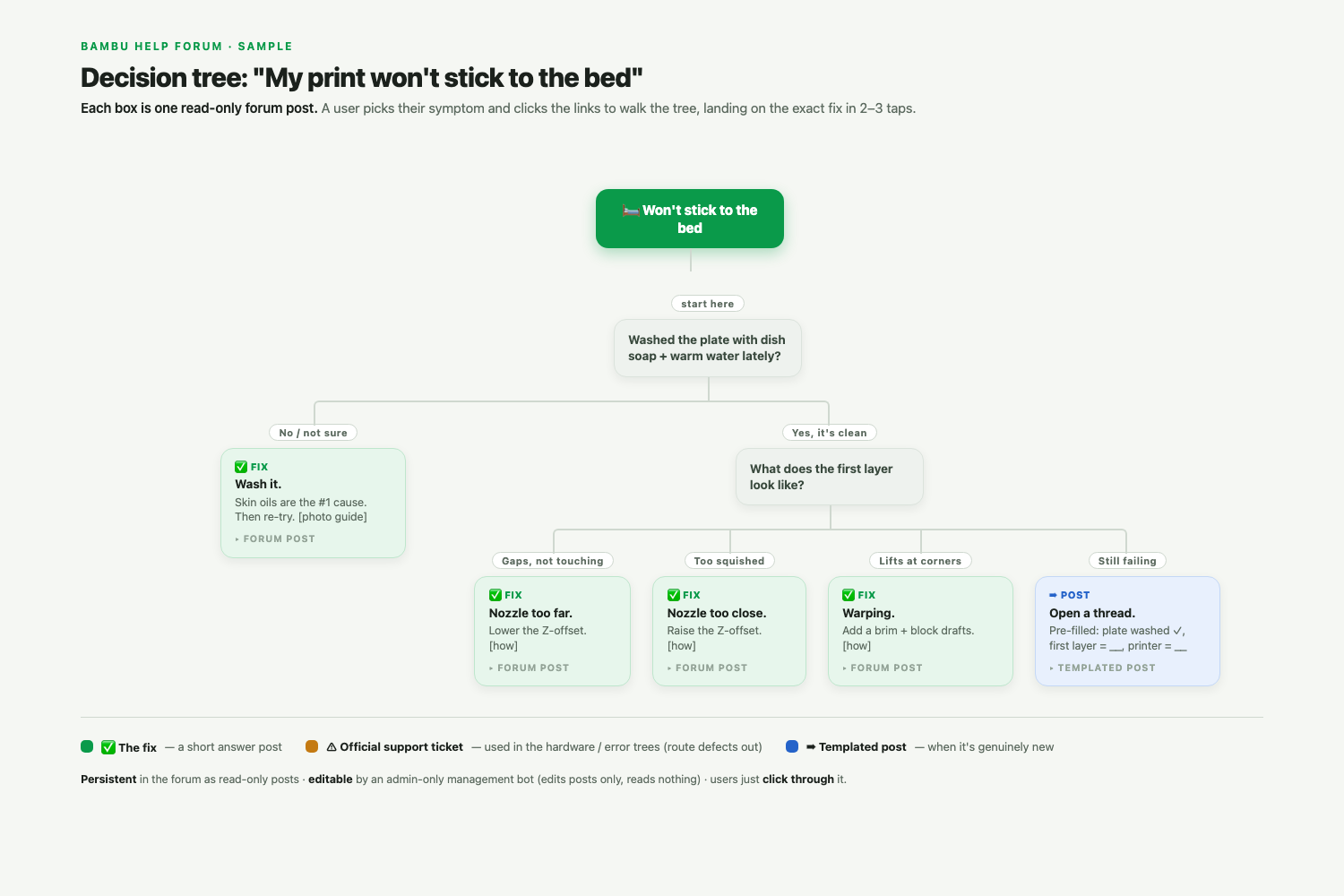
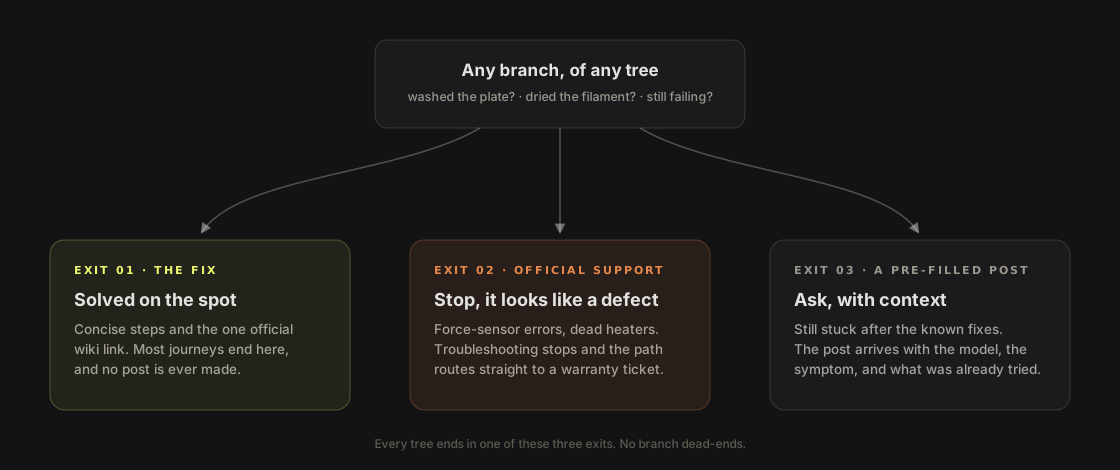
Before posting, a member picks their problem and clicks through a short flowchart. It walks them through the quick, standard fixes that usually work, like “wash the plate” for bed adhesion. Every path ends in one of three places: the fix, a route to official support if it looks like a defect, or a pre-filled post if they are still stuck. Most never need to post.
A bot moderators run from the web
A simple bot renders the flow inside Discord. Moderators edit and publish the whole flowchart in bulk from a web dashboard, so the content stays current without anyone touching code.
A standard way to ask
When a post is still needed, a required format makes sure it includes the printer model, the symptom, and what was already tried. In the content analysis, 22% of posts arrived without even the model, the one fact every answer depends on. The people answering start from a clear report, not “plz help.” That saves their time, and their patience.
·Every path ends in one of three exits
The bed-adhesion tree at the top is the pattern in miniature. The standard fix, wash the plate, is the advice helpers give constantly and beginners ignore, so it becomes step one of a flow they click through, not a line they skim past. And whichever branch they take, every tree ends the same way.
·Every part traces to a finding
- H4, no standard for asking → the required format standardizes the ask.
- H5, nothing preventive → the flow deflects duplicates and catches defects before a post happens.
- H2, jargon → plain-language problem names, not vocabulary a beginner lacks.
- H9, no diagnosis → the flow is guided diagnosis, including the route to official support.
- H10, delivery → the specific answer at the point of need, never a generic link.
And it all lives where the question gets asked, inside Discord. The wiki failed because it was a link. A separate site would be another link. The answer belongs in the room. The flow starts with the problems that account for most of the volume and grows one branch at a time.
·One system, four pieces
Under the hood the system stays deliberately small. Moderators work in a web dashboard where the whole tree is drafted, reviewed, and gated. A bot does nothing but publish the reviewed result into Discord as read-only forum posts, first to a staging server, then to the live one. Members only ever touch ordinary posts, and nothing they do flows back: the bot reads no member messages and stores no member data.
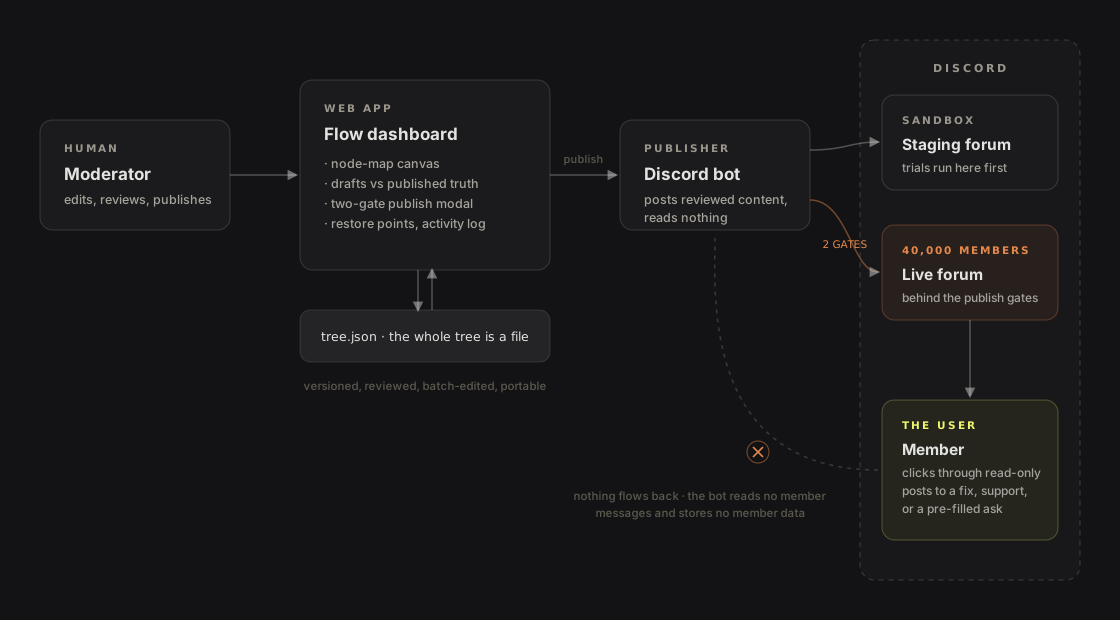
The direction I killed. The first version rendered the flow as interactive bot buttons inside a post, and it worked. I retired it anyway. Plain interlinked forum posts do the same job with nothing to break, nothing for future moderators to maintain, and no interaction data collected at all, which kept the privacy promise to the mod team literal: the bot reads nothing from members. Throwing away a working build for a simpler one was the best design decision in the project.
One layout for editing, another for publishing.
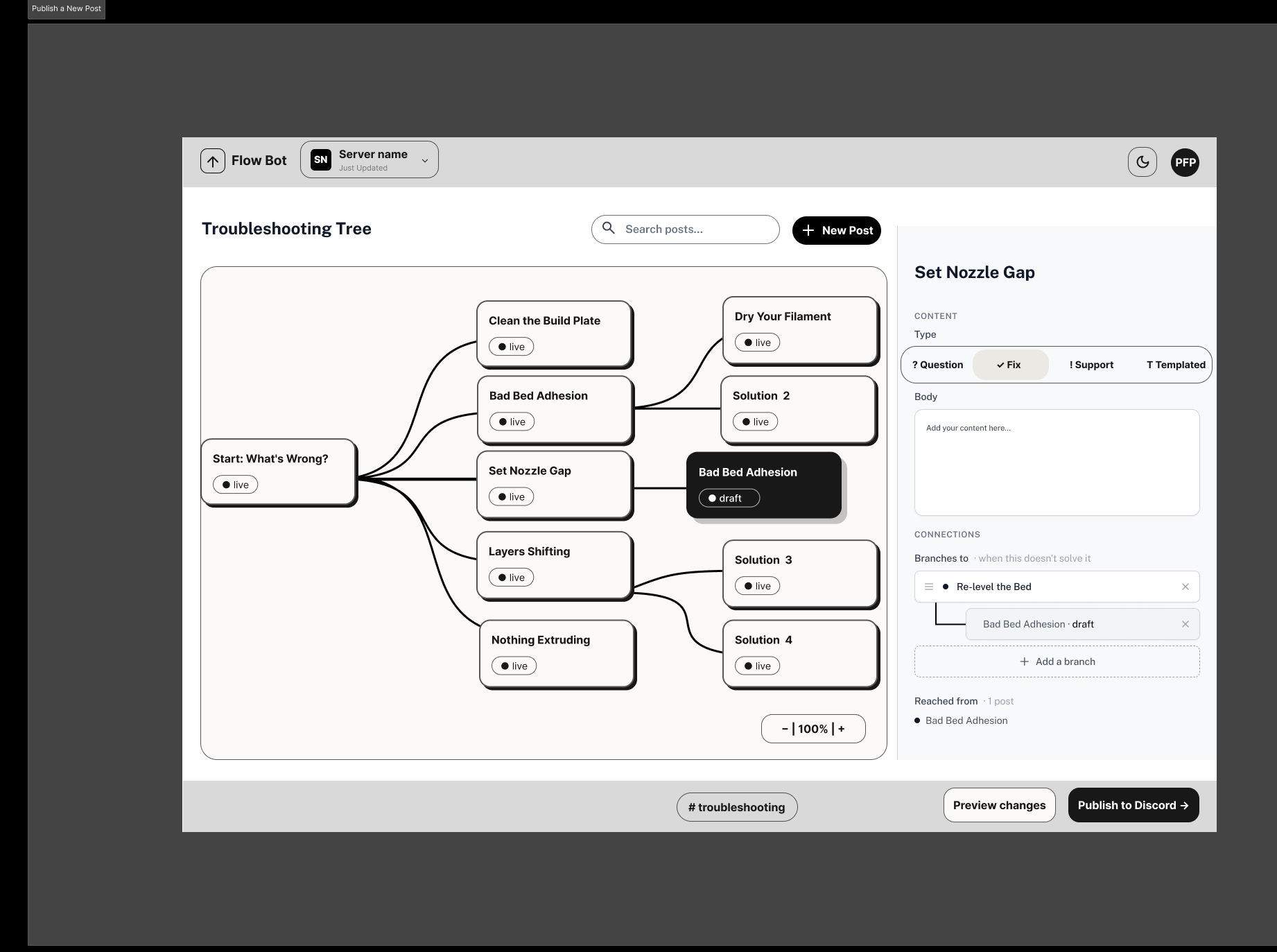
The bot renders the flow, but moderators keep it current from a web dashboard. That tool had a design problem of its own: two very different actions living on one screen. It went from gray boxes to mid-fi to a deployed product, and the layout decision survived every step.
Editing a post happens constantly and is easy to undo. Publishing to a 40,000-member community happens rarely and is hard to take back. Those are not the same job, so I did not give them the same layout. Six gray-box wireframes each tested one question about where editing should live and what should happen the moment something goes live.
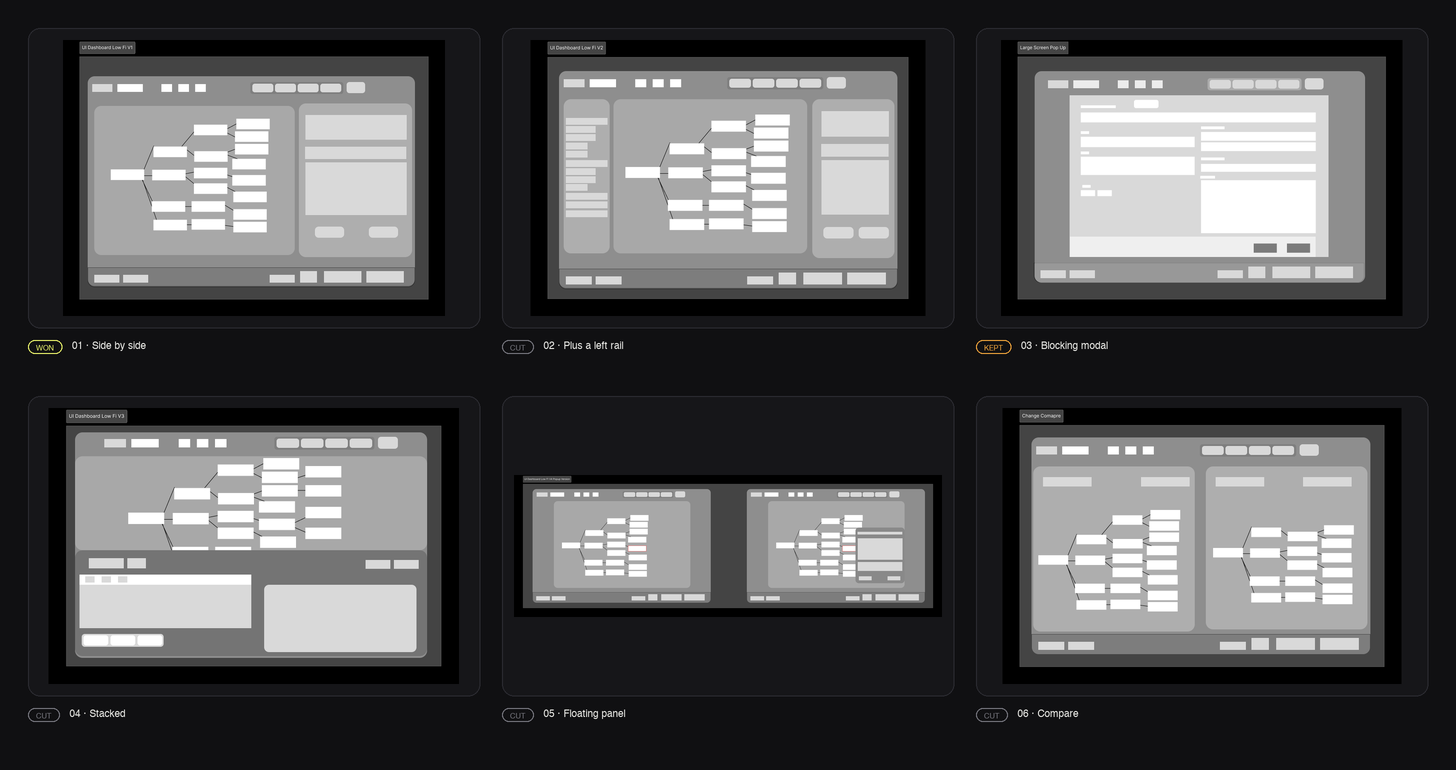
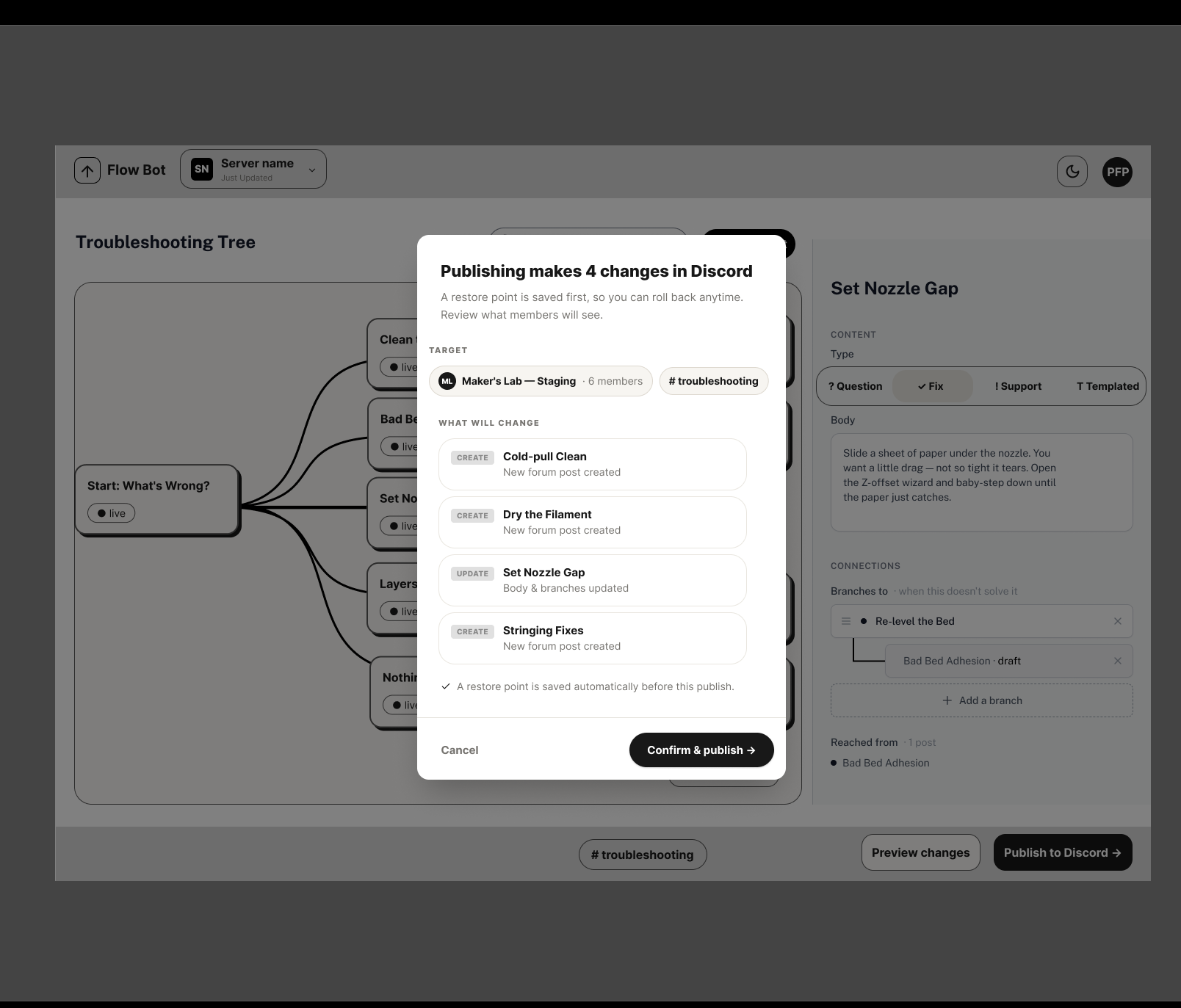
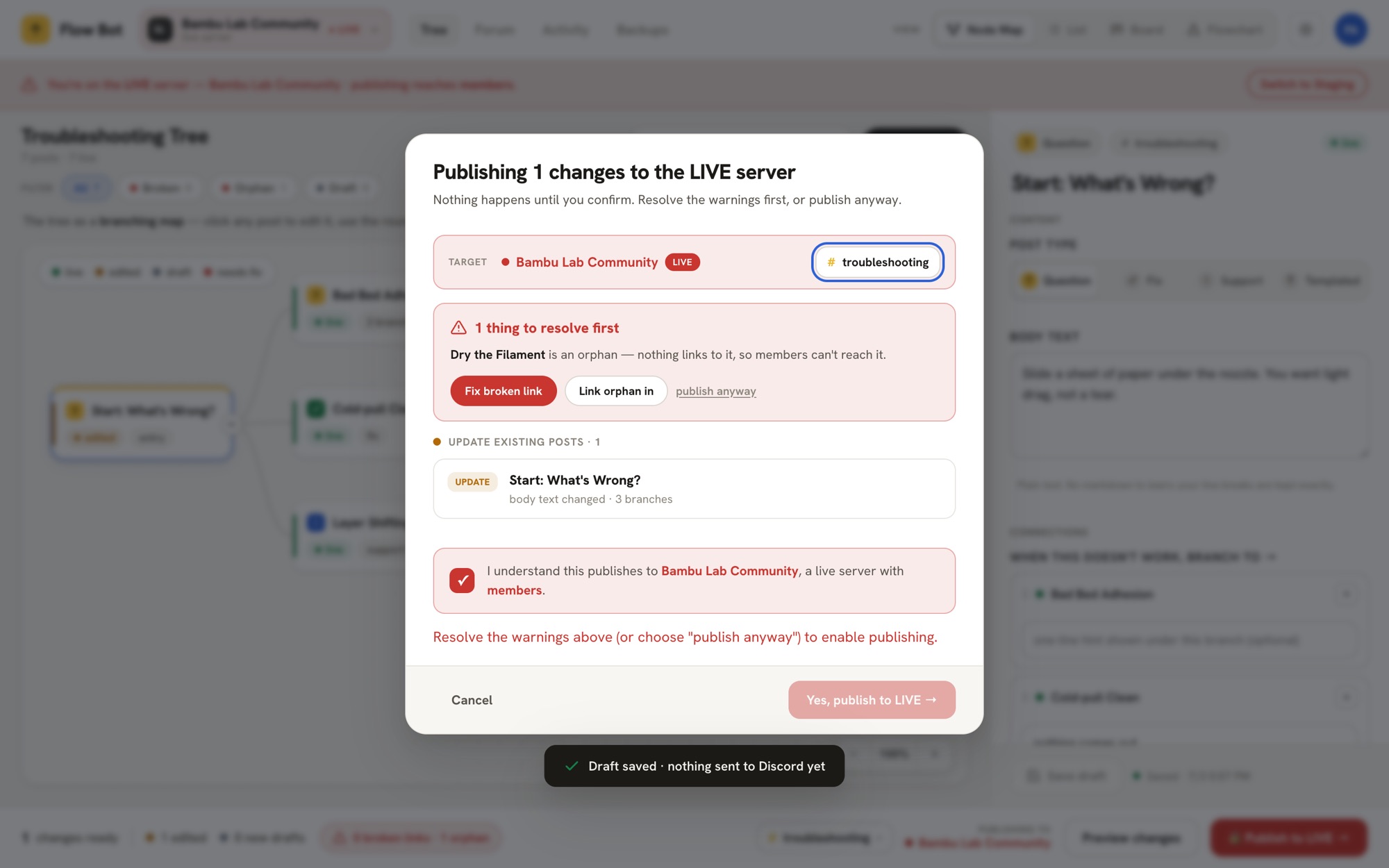
The rule that fell out of it. Routine and irreversible actions do not share a layout. A docked panel is right for the edit you make fifty times a day. A blocking modal is right for the publish you make once, when it should stop you and make you look first.
Then the two survivors moved to the jobs they suited. Editing kept the simple two-panel split, and the blocking modal became the publish confirm screen. Everything else, including the compare view, was cut.
·Validated in mid-fidelity
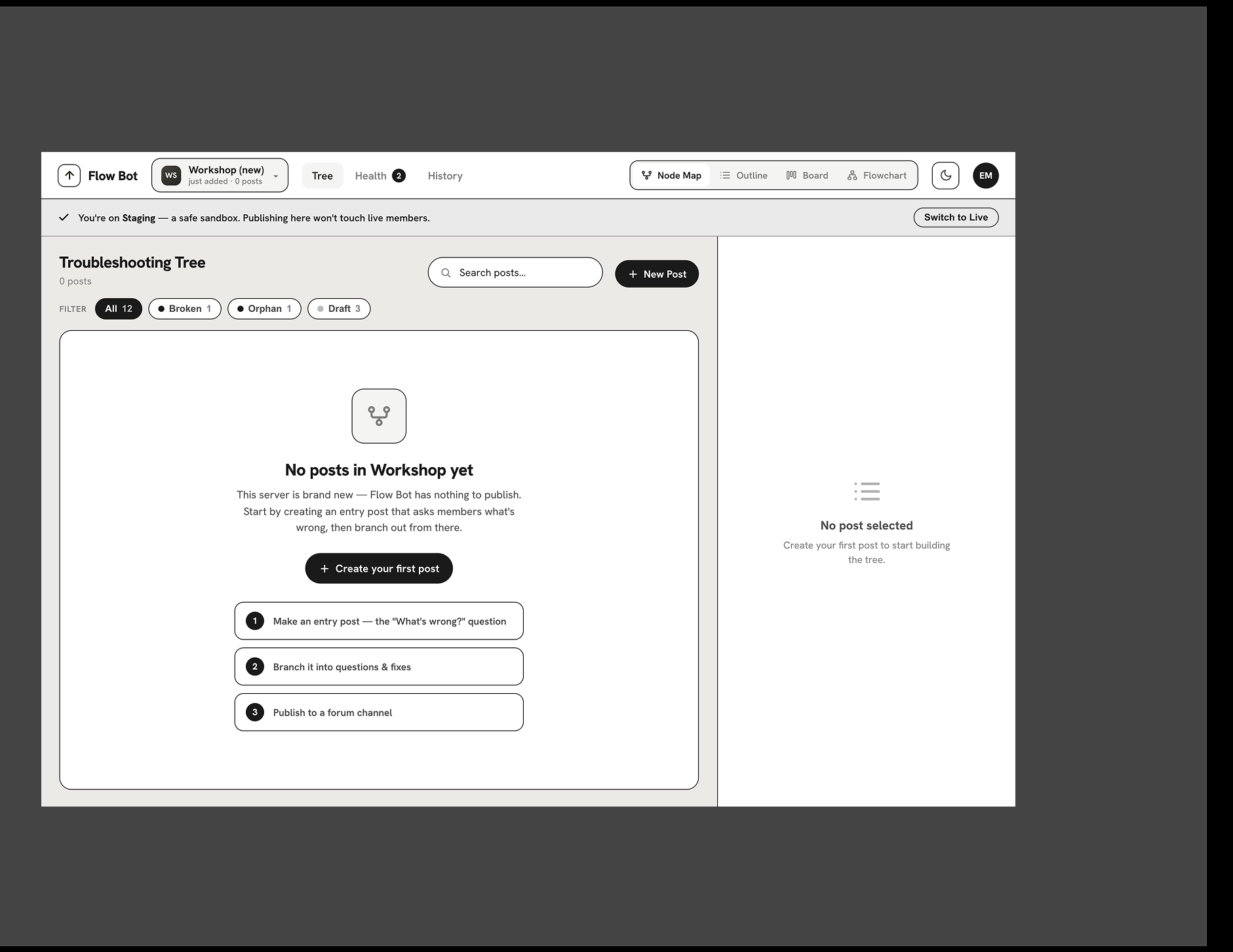
Wired to a live bot and real Discord data, the low-fi decisions held.
·Shipped: the working dashboard
The mid-fi screens then became the real product. What follows is not a mock. It is the deployed dashboard, running against the live bot, in the same layouts the gray boxes argued for.
One capability matters most for maintenance: the whole tree is a file. The complete 118-post flow loads from a single JSON upload, publishes to Discord in one action, and re-publishing updates the existing posts in place instead of duplicating them. The same file downloads back out, so the tree can be versioned, reviewed, batch-edited, or moved between servers. That is what let the full data-driven tree be authored offline from the 104-post analysis and go live in one click, and it is what makes handing the tool to moderators realistic: no one maintains 118 forum posts by hand.
The file format is also how the tool stays AI-friendly without running any AI itself: the dashboard hands the moderator a self-contained prompt to paste into whatever assistant they already use. One prompt interviews them and drafts a new tree; a second embeds the current tree and returns a batch of edits, with hard rules baked in, the strictest being that the AI may only cite documentation links the moderator gives it, never invented ones. The bot stays a dumb publisher of reviewed content, which is exactly what keeps the privacy promise simple.
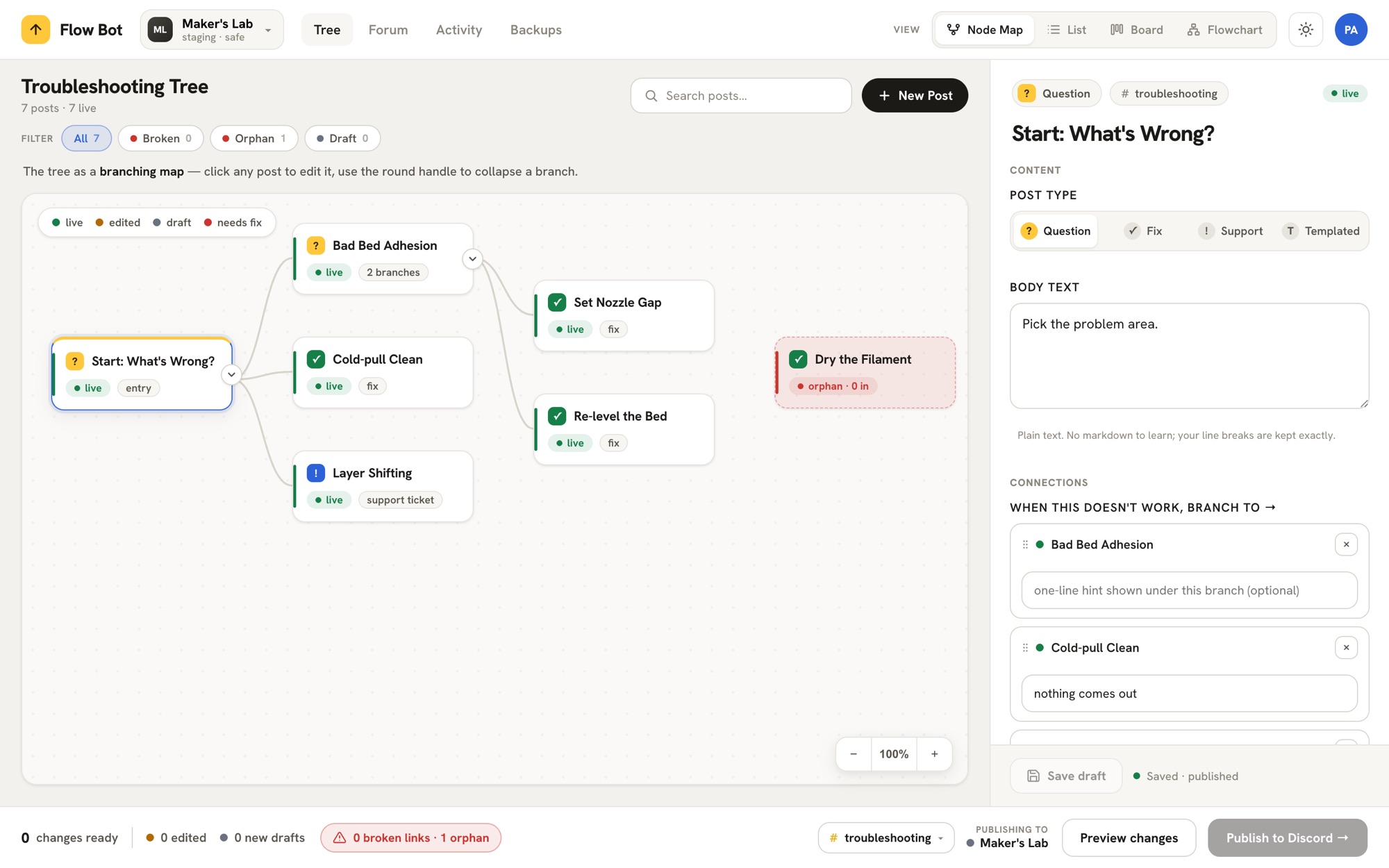
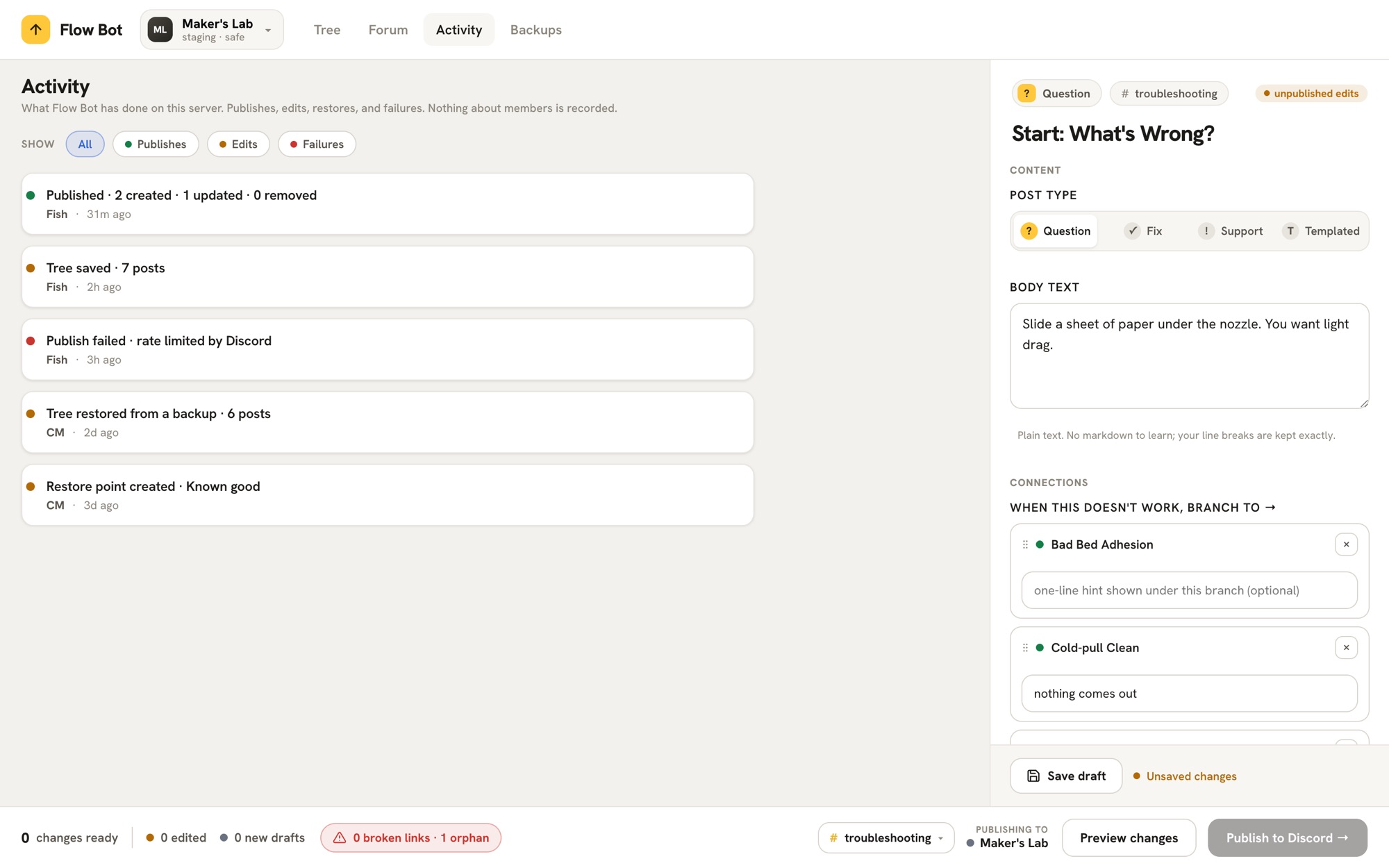
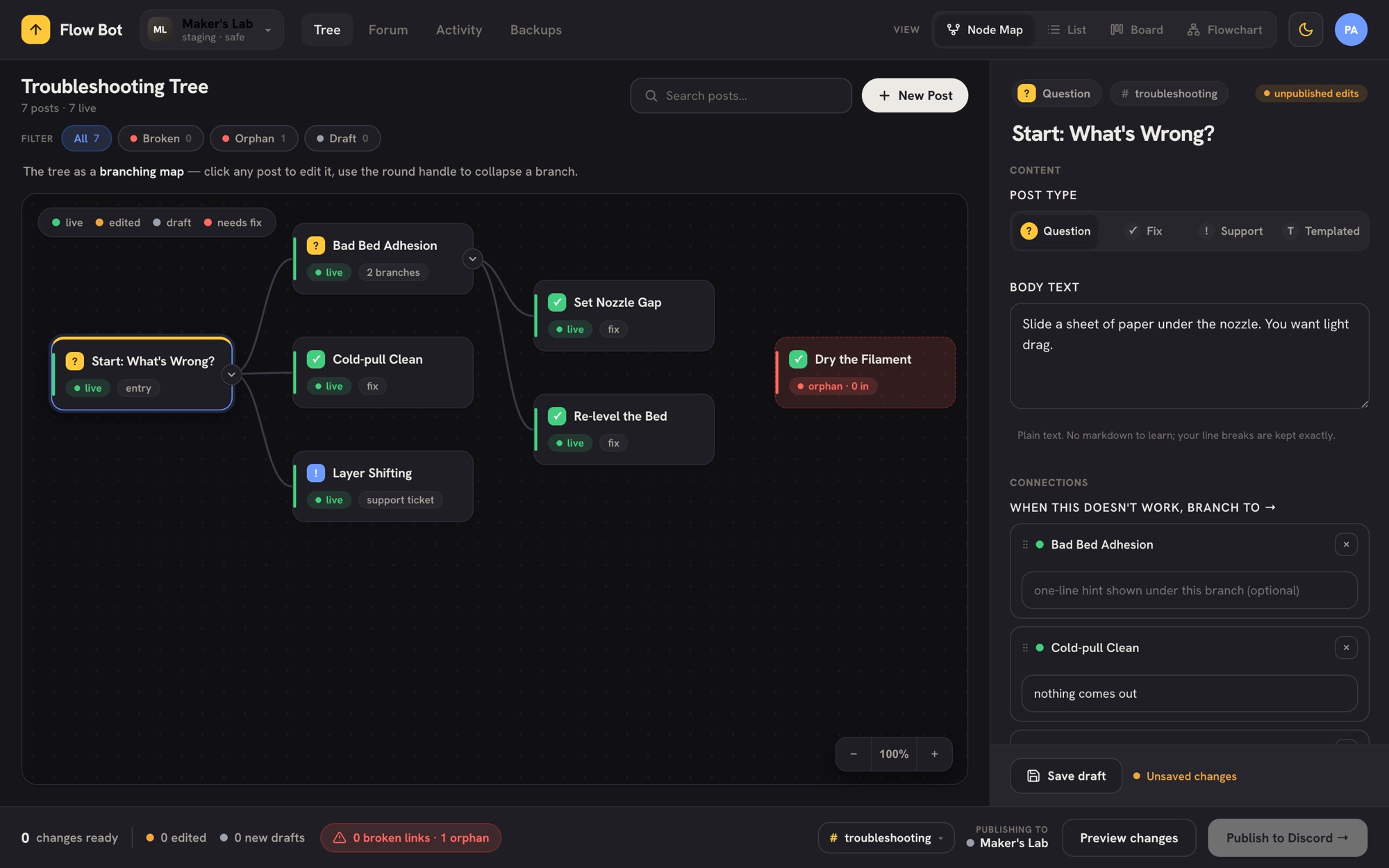
Then the canvas learned to build the tree.
The shipped editor could show the tree and change one post at a time, but growing it, adding a branch, still meant filling out a form. The last pass on the dashboard made the structure something a moderator edits by touching it: drag a card to arrange it, pull its edge to branch, drop it on another card to connect.
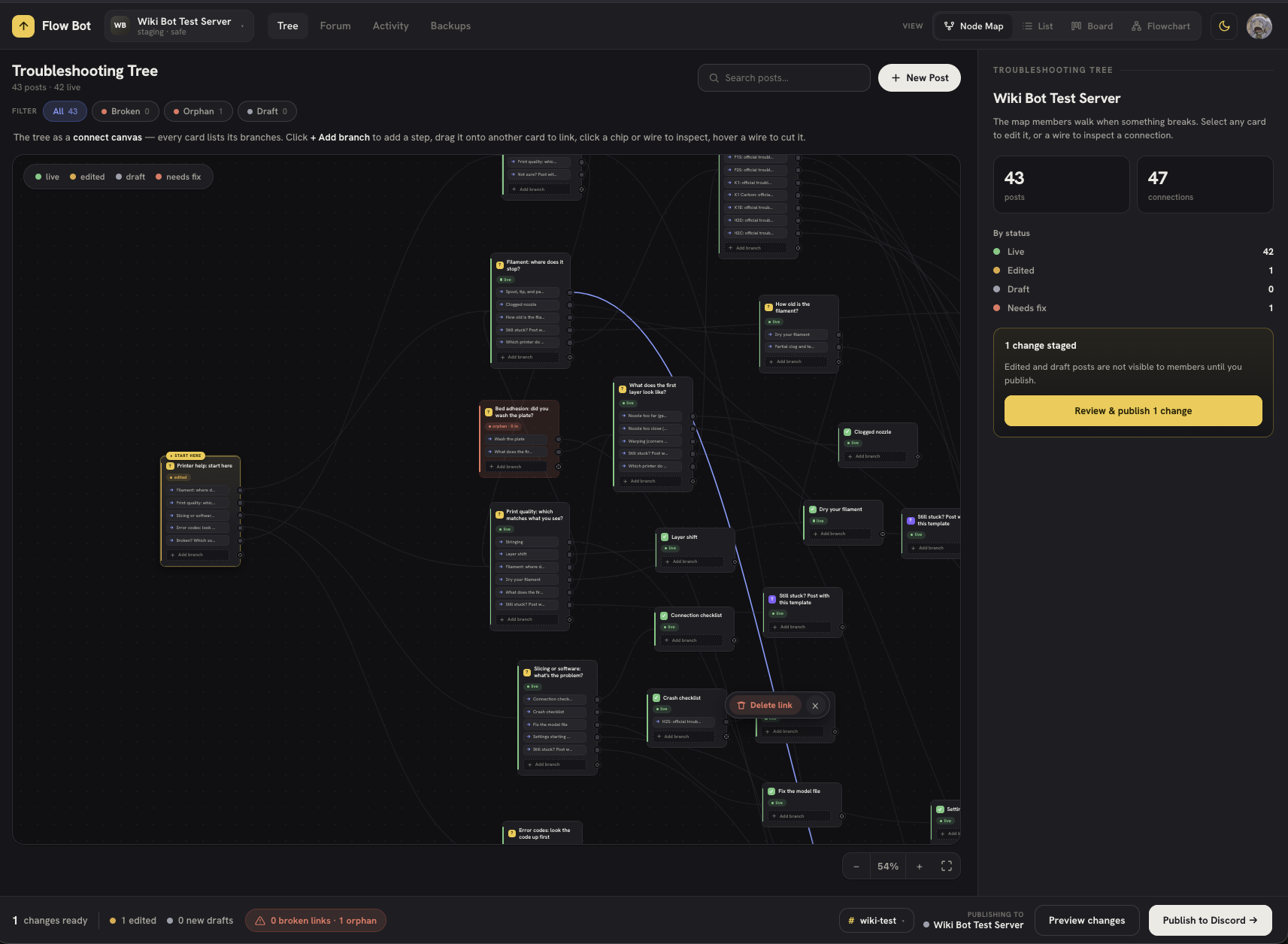
·One card, one honest handle
The first version gave every card a single handle on its edge, a tail, to pull a new branch from. It shipped, and then it failed on the thing the whole tool is about: once a card had four or five branches, the tail could not say which wire belonged to which branch. So the second version moved the branches onto the card. Each outgoing link is its own chip with its own port on the edge, and each wire leaves from the chip it belongs to, so the tree is readable in both directions: what a card asks, and where each answer goes.
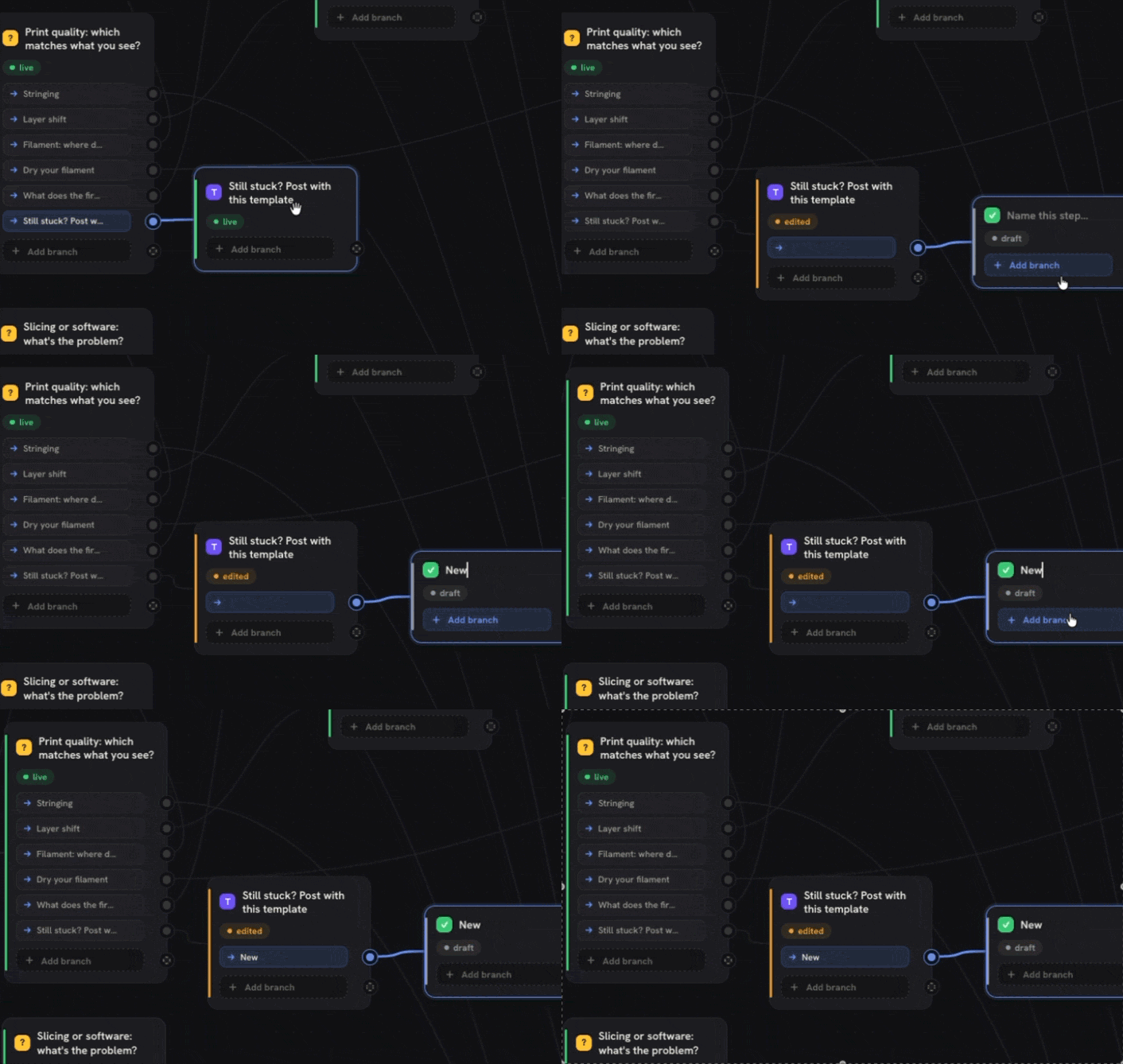
·Connecting is the safe move
Adding a step and connecting two posts are the same gesture: pull from a card’s edge. Drop on empty canvas and a new post appears where you left it, ready to name. Drop on another card and the two link. What matters is what the drag refuses to do. It lights a target green and offers “Link here” only when the link is valid, and warns in amber on a self-link or a duplicate, so a bad connection is caught in the gesture, before it exists.
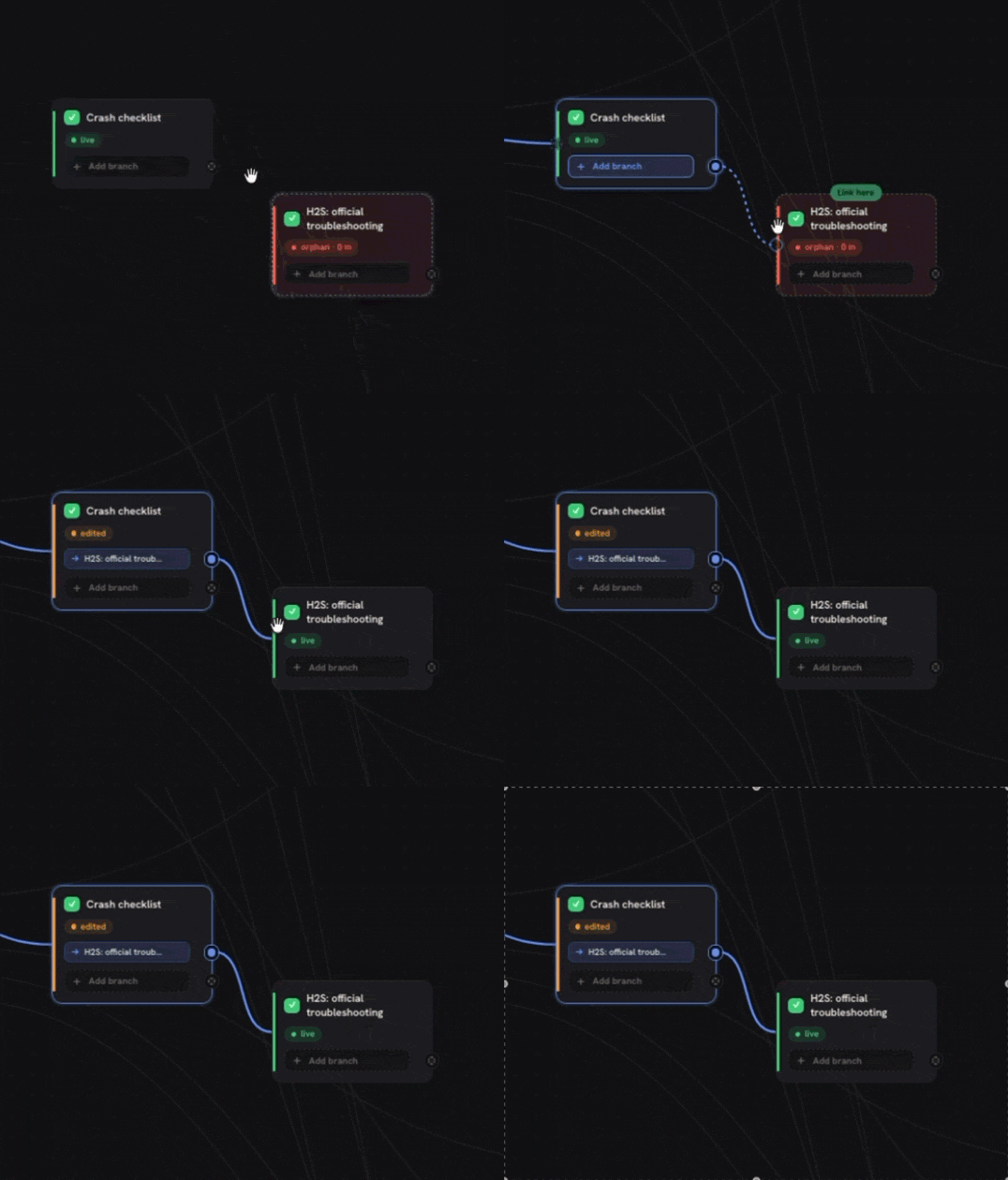
The same rule shapes how a post is born. A new post starts as a draft that reaches no one until it is published, and the form makes you choose what it branches from before it can exist, so a post can never be created as an orphan members cannot reach.
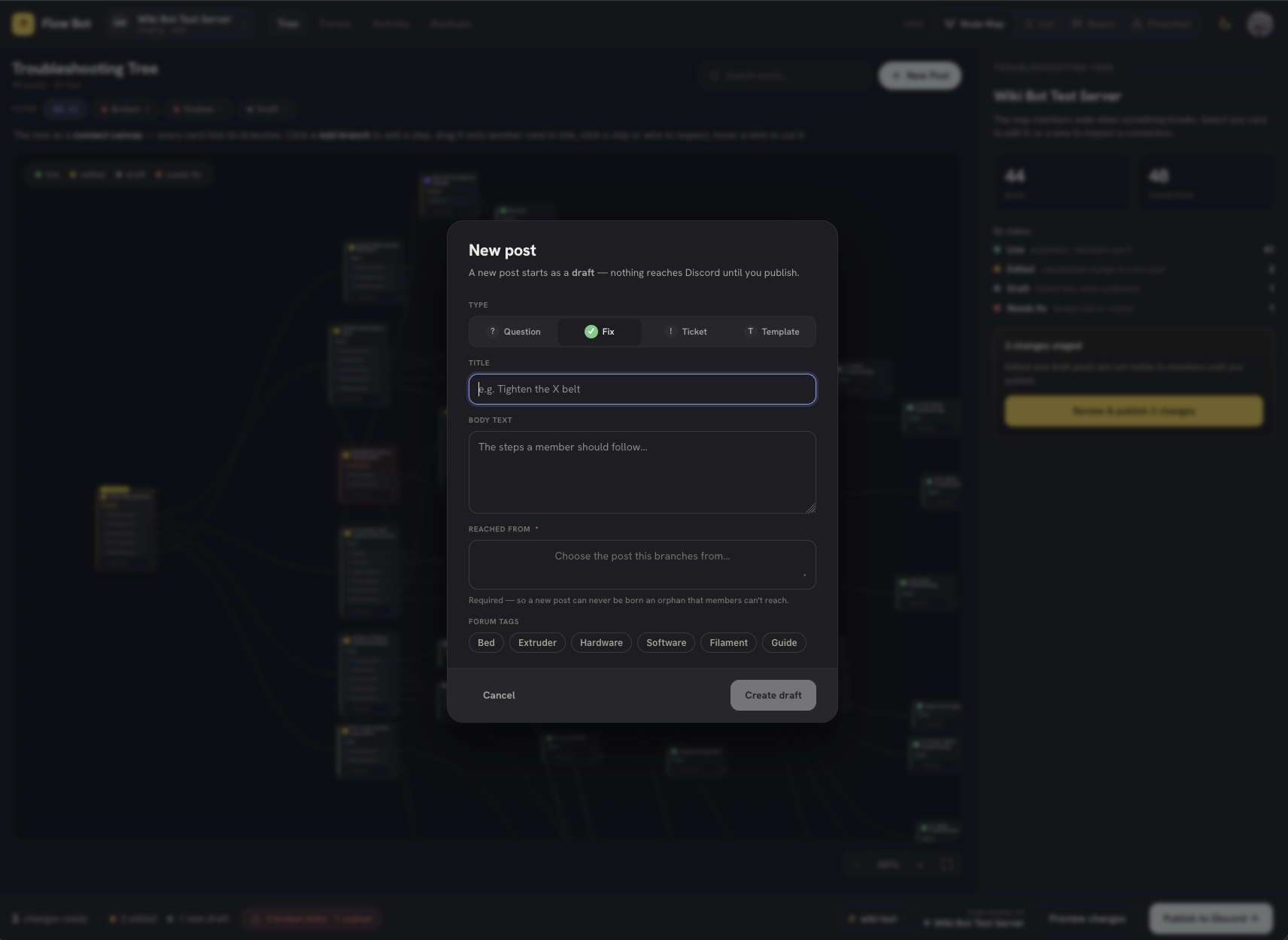
What I chose not to build. The mockups had a manual switch to set a post Live, Edited, or Draft by hand. I left it out. A post’s status is not a label a moderator should set; it is the truth of what is published versus what is only staged. A control that lets you mark something “Live” by hand is a control that lets the dashboard lie about what members can see.
Greenlit for a live trial.
I brought the proposal, the full flow, and the ask standard to the moderation team. The lead moderator greenlit it for a real trial.
That is what matters most. This is not a hypothetical redesign. It is a researched, designed system that a 40,000-member community agreed to put in front of real users. The bot and dashboard are built and deployed, and are in internal testing now. The trial starts with one tree, bed adhesion, in a staging space, with a before-and-after baseline so the deflection can be measured.
The real goal: keep the helpers helping. The volunteers are the community's only safety net, and they are not paid. Every duplicate the flow deflects, and every clean report the standard produces, is volunteer time and patience handed back. Protect the helpers, and the help survives.
·The measurement plan
The trial is designed to be judged, not just launched. Three steps, in order, because the first one cannot be redone.
Lock the before baseline
For bed adhesion, before the tree goes live: duplicate posts per week, the share that include a printer model and a first-layer photo, the share that ever resolve, and time to a first useful reply. This is the irreversible step. Once the tree exists, the clean “before” is gone.
Run the staging trial
Publish the bed-adhesion tree in the staging space, watch how members move through it, and log every wrong route and confusing step. One tree, deliberately, so a failure is cheap and a fix is fast.
Measure the delta
The same numbers, after: duplicates, missing context, resolution rate, and helper effort. Whatever the result says, it gets published here.
Findability beats more content. Every time.
- The lever is delivery, not volume. The mod team had already tried more content, a supplementary site on top of the wiki that did not stop the repeats.
- A help system has two users. The people answering need protecting as much as the people asking.
- Knowing when to stop is a design decision. Routing the ~15% defects away from troubleshooting was the highest-leverage call.
- Meet people where they already are. Native in Discord beat any separate site, because the separate site was the problem.
And one thing I would do differently: I built the solution twice before I understood the problem once. The supplementary site came before the research, and the button-driven bot came before the simpler posts. The 104-post analysis was the cheapest step in the whole project, and it is the one that invalidated the most work. Next time, it goes first.